

 CBSE
CBSE
What is PEN Number for Students? Meaning, Full Form & How to Find It
Quick Answer: A PEN (Permanent Education Number) is a unique 11-digit ID assigned to every student in India through the government's UDISE+ system. It's issued automatically the first time a student's details are entered into the school's records, and it stays the same for life, from pre-primary through college, even if the student changes schools or states. To find it, check a recent report card or Transfer Certificate, log in to DigiLocker, or ask the school office to look it up in their UDISE+ Student Module.
If you've ever tried to fill out a scholarship form, transfer your child to a new school, or set up their APAAR ID and hit a field asking for a "PEN number," you're not alone. It's one of those government terms that shows up everywhere in a student's paperwork but is rarely explained anywhere.
Don't worry, we will help you understand what a PEN number for students is, why the government made it mandatory, and exactly where to find it.
Let's get started!
What Does PEN Number Mean?
PEN stands for Permanent Education Number. It's a unique ID issued to every student in India the first time their details are entered into the government's education database, and it's meant to work as a lifelong academic identity, similar in spirit to how Aadhaar works as a lifelong personal identity.
The "permanent" part matters. Once a student is assigned a PEN, it doesn't reset when they move to Class 6, switch boards, transfer to a different school, or even move to a different state. It stays attached to that one student from their first year of school through college, which is exactly why it's become the anchor ID for so many other systems, including report cards, transfer certificates and marksheets, admission registers, attendance registers, and newer digital IDs like APAAR.
What is the Full Form of PEN Number?
PEN's full form is Permanent Education Number, sometimes written as Permanent Enrollment Number depending on the state. It's issued through UDISE+ (Unified District Information System for Education Plus), which is the Ministry of Education's central portal for tracking schools, teachers, and students across the country.
Here's how the number actually comes into existence, step by step: a school collects a student's basic details, name, date of birth, gender, and parents' names, and enters them into the UDISE+ Student Module. Once that entry is saved, the system automatically generates the PEN in the background. No one at the school types in the number or picks it; it's assigned by the system itself, and once assigned, it's a one-time, unchangeable ID for that student.
What Does a PEN Number Look Like?
A PEN number is typically an 11-digit numeric code, for example: 12345678901. In some newer state rollouts, particularly those tied to APAAR, you may see it referenced as a 12-digit number instead. If your document shows one extra digit compared to what you expected, that's usually why. It's not an error.
It's worth clearing up a common mix-up here: a school's UDISE Code and a student's PEN are both 11-digit numbers, but they work very differently. A UDISE Code is geographically structured and decodable. The first two digits tell you the state (for example, schools in Tamil Nadu start with "33"), the next two tell you the district, and the remaining digits step down through block and school.
A student's PEN, by contrast, is not decodable this way. It's generated for uniqueness, not for geographic meaning, so you can't tell anything about a student's state, district, or school just by reading their PEN. If you're also trying to make sense of other numbers on a student's documents, like the certificate number on a CBSE marksheet, the same rule applies: different numbers on the same document usually serve completely different purposes.
Why is PEN Number Mandatory for Students in India?
Before PEN, India's school data had a structural problem: there was no reliable way to know if a student counted in one district's enrollment numbers was the same student who'd shown up in another district's numbers after a family relocated. Multiply that across hundreds of millions of students, and government planning, funding, and dropout-tracking all became guesswork. PEN was introduced specifically to fix this.
In practice, it does four things:
- Eliminates duplicate counting. A student who transfers schools mid-year is still recognized as the same person in the national database, not counted twice.
- Makes transfers paperless. A receiving school can pull a student's full history using their PEN through the Import Module, instead of relying on the family to carry physical records.
- Feeds real-time national tracking. Enrollment and dropout data collected through PEN directly informs schemes like Samagra Shiksha and the Mid-Day Meal program, which allocate funding based on accurate, deduplicated student counts.
- Speeds up scholarship and benefit verification. Many state and central scholarship portals now ask for a PEN to instantly confirm a student's identity and enrollment status, cutting down on manual document checks.
One nuance that trips a lot of parents up: PEN is generally mandatory for students in government and government-aided schools, and most private schools have adopted it too since it's needed to stay compatible with state databases, but a newly established school or one following an alternative curriculum may not yet be fully onboarded. If a school genuinely can't locate a PEN for a student, this is one of the more common reasons, not necessarily an error.
What is the Difference Between PEN, EMIS, UDISE Code and APAAR ID?
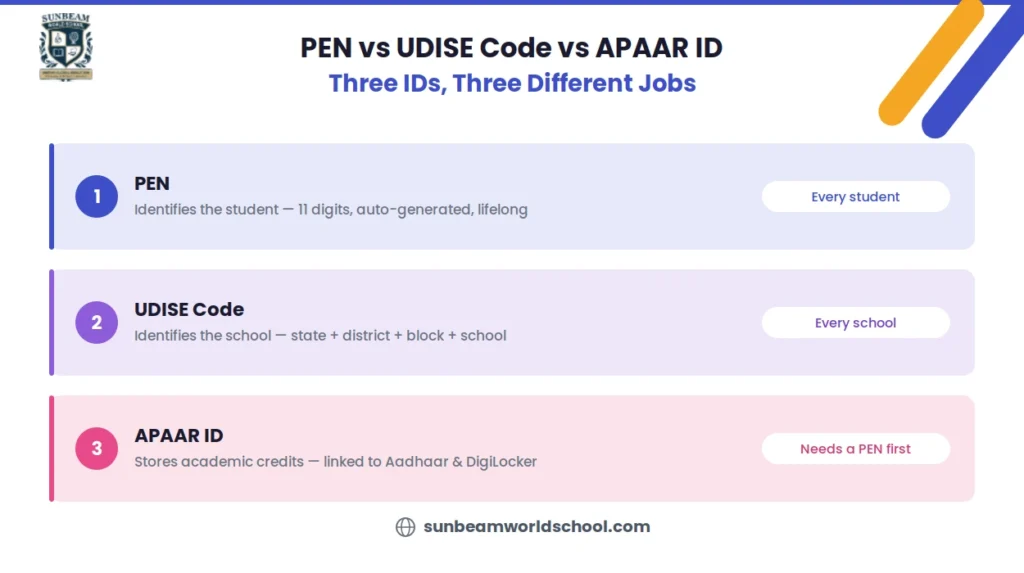
PEN vs UDISE Code vs APAAR ID: Understanding the Difference
These four terms PEN, EMIS, UDISE code and APAAR ID are used almost interchangeably online, which is exactly why so many people land on this page confused. Here's what each one actually identifies:
| Term | What It Identifies | Who Has It | Key Detail |
|---|---|---|---|
| PEN | An individual student | Every student | Auto-generated, unchangeable, not geographically decodable |
| UDISE Code | A school (not a student) | Every school | 11 digits, decodable: state + district + block + school |
| EMIS | An older, state-run education tracking system | Varies by state | Largely phased out in favor of UDISE+ |
| APAAR ID | A student's academic-credit ID, linked to Aadhaar and DigiLocker | Every student (newer system) | Requires an existing PEN to be generated |
The relationship between PEN and APAAR is worth understanding specifically, since it's a frequent source of confusion. APAAR (Automated Permanent Academic Account Registry) is the newer, DigiLocker-linked ID meant to store a student's certificates, marksheets, and achievements in one digital wallet. But APAAR can't exist without PEN, PEN is one of the mandatory fields required to generate an APAAR ID in the first place, alongside the student's Aadhaar number and a name that matches Aadhaar exactly. So think of it this way: PEN identifies the student within the education system, and APAAR builds a digital records wallet on top of that identity.
How Do I Get My PEN Number Online?
There's no single public website where you can type in a student's name and pull up their PEN, and this isn't an oversight; it's a deliberate privacy safeguard. The official portal, udiseplus.gov.in, does have a public "Know Your School" lookup for verifying school details, but there's no equivalent public tool for individual student records. That means getting a PEN online always routes through one of two paths: a document that already has it printed, or a self-authenticated login like DigiLocker.
How Can Parents Find PEN Number Online for Students?
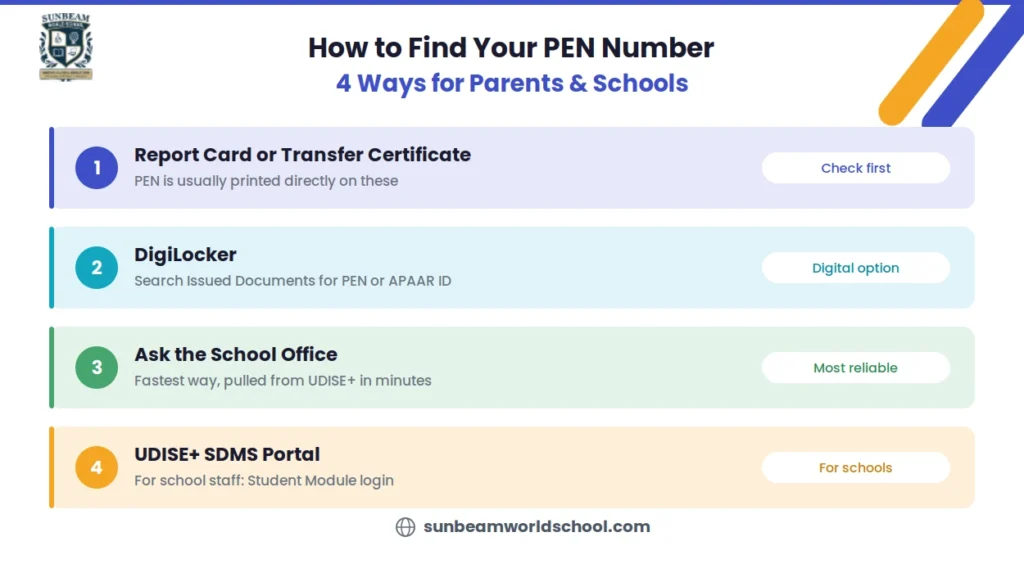
4 Easy Ways to Find Your PEN Number
Parents can find their child's PEN Number through the recent report card, DigiLocker, or the school office. Check how to get the PEN number for students easily:
-
Check the most recent report card or Transfer Certificate (TC)
Most schools now print the PEN directly on these documents, since it's supposed to be recorded on TCs, record sheets, admission registers, and attendance registers as standard practice. This is usually the fastest option if you have any recent paperwork on hand.
-
Check DigiLocker
If your child's school has linked their records to DigiLocker (which is increasingly common now that APAAR ID generation depends on it), log in at digilocker.gov.in using the student's or parent's Aadhaar-linked mobile number and OTP. Search "Issued Documents" for anything from the school or the Academic Bank of Credits; if an APAAR ID card has already been issued, the PEN is usually referenced within it.
-
Ask the school office directly
This remains the single most reliable method. School administrative staff can look up the PEN in their UDISE+ Student Module within minutes, since it's already tied to the student's saved profile. This is also the right first step if you're in the middle of a broader admission or transfer process, since the school will typically need to verify or update the PEN as part of that process anyway.
A word of caution: if you're searching by name through any school-linked portal, the name has to match the Aadhaar card exactly, down to spelling and initials. A mismatch here is the single most common reason a lookup fails, and it's covered in more detail below.
How Do School Admins Check or Generate a Student's PEN Number on UDISE+?
School staff work through the UDISE+ SDMS (Student Data Management System) portal at udiseplus.gov.in, using login credentials issued to the school by the Block or District MIS office. The process differs slightly depending on whether the student is new to the system or transferring in:
- Log in to the UDISE+ SDMS portal with the school's official credentials.
- Go to the Student Module.
- If the student is transferring in from another school, use the Import Module rather than creating a fresh entry. This pulls the student's existing PEN and full history automatically, preventing a duplicate record from being created, which is exactly the problem PEN was designed to solve.
- If the student is new to the system, enter their details (name matching Aadhaar exactly, date of birth, gender, parents' names) and save the record. The PEN generates automatically at this point; there's no field where staff manually enter or choose the number.
- To verify an existing student's record, search using their Aadhaar number and Year of Birth.
If a PEN turns out to be wrong or duplicated, it's not something a school can quietly edit on their end. Correction typically requires escalation to the District or State MIS office, since PEN is meant to be a stable, tamper-resistant identifier once assigned.
How Do I Check My PEN Number If I've Forgotten It?
There's a fair amount of conflicting advice online about this, so here's the realistic breakdown of what works and what doesn't:
- There is no reliable public "PEN search" tool, despite what some third-party websites claim. Be cautious of sites promising to look up a student's PEN using just a name and date of birth; the official system doesn't offer this, and entering a child's personal details into an unofficial site is a real privacy risk.
- Your most recent report card or TC is the fastest legitimate shortcut, since PEN is meant to be printed on both.
- DigiLocker is the best digital fallback, particularly if an APAAR ID has already been generated for the student, since PEN is a required field in that process and often shows up alongside it.
- Contacting the school is the guaranteed fix. If the first two don't work, the school can pull it from their UDISE+ dashboard directly, and this is genuinely the most reliable route, not just a fallback.
What Happens to a Student's PEN Number During a School Transfer?
A student's PEN doesn't get reissued or reset when they change schools, it simply travels with them. Here's the actual sequence:
- The new school logs into UDISE+ and uses the Import Module, searching for the student by their existing PEN, Aadhaar number, and date of birth rather than creating a new profile from scratch.
- Once matched, the student's full academic history transfers into the new school's system automatically, no manual re-entry of past records required.
- Parents typically receive an automated SMS confirmation once the import completes successfully, which is worth watching for as informal proof the transfer went through on the government side, not just on paper with the new school.
This Import-based transfer is arguably the single biggest practical benefit of PEN for families who relocate frequently, since it removes what used to be a slow, document-heavy re-verification process at every new school. It's especially relevant for families switching schools mid-year, where a smooth PEN-based Import can be the difference between a same-week transfer and a weeks-long paperwork delay.
Why is My PEN Number Not Getting Verified?
By far the most common reason a PEN fails to generate, or an existing PEN won't verify during an APAAR or transfer process, is an Aadhaar name mismatch. UDISE+ cross-checks the student's name in the school's records against their Aadhaar card, and even a small difference, a missing middle name, a different spelling of a common name, an extra or missing initial, is enough to block the match.
How to actually fix it:
- Compare the Aadhaar name to the school record letter by letter first; don't assume they match just because they look similar at a glance.
- If the Aadhaar card itself has the error, correct it through the official UIDAI process, either online at the UIDAI portal or in person at an Aadhaar Seva Kendra. This is almost always faster than trying to get the mismatch resolved from the school-records side.
- For APAAR-specific mismatches, schools are generally advised to direct parents to a Common Service Centre (CSC) for the correction, since APAAR generation is particularly strict about exact name matching.
- Once the names align exactly, re-run the search or re-submit the student's details on UDISE+; the record should validate on the next attempt.
Conclusion
A PEN number can feel like just another government acronym, until the day you actually need it for a transfer, a scholarship form, or an APAAR ID and can't find it anywhere. Understanding what it is, where it lives, and how it connects to your child's broader academic record means you're never scrambling for it at the last minute, whether your child is starting school for the first time at the right age or transferring mid-way through their education.
At Sunbeam World School, every enrolled student's UDISE+ profile, including their PEN, is recorded accurately from day one and made available to parents through the school office, so families never have to chase this information down when it matters most. If you ever need help locating or verifying your child's PEN, our administrative team is happy to assist.

Frequently Asked Questions
What is PEN number in Hindi?
-PEN number in Hindi is called "स्थायी शिक्षा संख्या" (Permanent Education Number). It's an 11-digit ID auto-generated by the UDISE+ system when a student is first enrolled, and it stays the same throughout their entire academic life, regardless of school or state changes.
Can I get my PEN number without contacting the school at all?
+Is there a separate PEN number for teachers or non-teaching staff?
+Do all students get a PEN, or only government school students?
+How do I check my PEN number in Kerala or any other specific state?
+
In this article
Share this post:


Press and Blogs
Stay updated with our press releases, educational blogs, and more.

Quick Summary Essential Repeat (ER) in CBSE means a student has not met the passing...

Quick Summary: The main difference in has vs. have is the subject. Has is used...

Quick Summary A metaphor is a way of describing one thing by calling it something...